
 Immigration Case Management
  Family Immigration
  Business Immigration
  Features Overview
  Immigration Form-Filling
  Immigration Workflow
  Remote Collaboration
  Time Tracking and Billing
  Payment Processing
  Maximize Efficiency
  Document Management
  Immigration Software
  Blog
Blog  Webinars
  Testimonials
  Compare
 Introducing LollyDrive: Bringing Secure Document Storage and Refined Workflows to Immigration Firms

Immigration law firms manage a significant volume of documents for every case. Petitions, supporting evidence, identification records, government forms, emails, and internal case notes all need to be stored securely and accessed quickly. When documents are saved on local drives or disconnected storage systems, finding the right file at the right moment can slow down casework and create unnecessary risk.
The newly launched LollyDrive solves this challenge by bringing document management directly into LollyLaw.
With LollyDrive, immigration attorneys can securely store, organize, and access every case file directly within LollyLaw. Instead of relying on third-party platforms that require separate subscriptions and integrations, firms can now manage documents, cases, client communication, billing, and forms all in one place. LollyDrive enables your firm to:
- Centralize all case documents in one secure cloud-based system
- Find files instantly using custom folders, tags, and advanced search
- Organize documents by client, matter, or internal files
- Collaborate with your team confidently using permission controls and document version tracking
- Upload files quickly with simple drag-and-drop functionality
- Access documents anywhere without relying on local servers
Let’s take a closer look at how LollyDrive works.
Centralize Every Immigration Case Document in One System
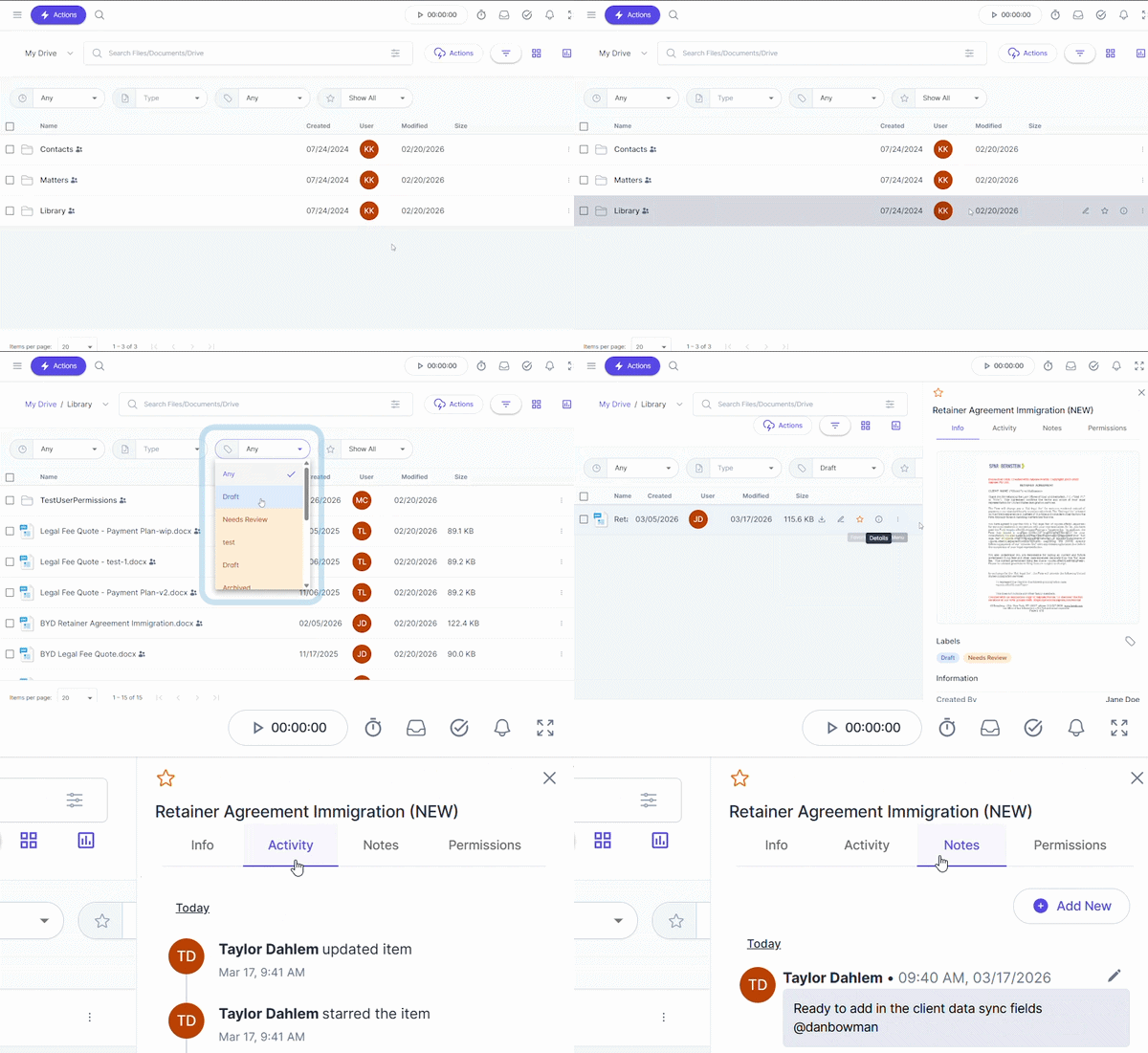
LollyDrive eliminates the complexity of managing documents across active cases by providing firms with a centralized repository for all firm & case-specific documents. Firms can create customized folder structures tailored to their practice areas and workflows, making it easy to maintain consistency across all matters.
LollyDrive also includes unlimited secure cloud storage, meaning firms never have to worry about running out of space or managing local server limitations. Every file is encrypted and accessible from anywhere, allowing attorneys and staff to work on cases whether they are in the office or remote.
Organize Case Documents by Contact and Matter
LollyDrive allows firms to organize files for both firm-wide and matter-level accessibility and efficiency. Firm-level documents, such as SOPs or employee handbooks, can be structured to provide quick access to frequently used files that all staff can use. Client-specific files, such as birth certificates or employment letters, can be organized directly within the contacts and matters themselves. Not only does this streamline casework, making it easy for attorneys and staff to view documents alongside case notes, deadlines, and other critical information, but parameters can also be set, allowing access only to staff tied to the case.
To further streamline organization, LollyDrive allows firms to apply custom labels and tags to documents. These tags help categorize files by document type, case stage, or internal workflow so teams can quickly search for the right file when they need it. Powerful filtering tools make this process even faster. Users can filter documents by date, document type, tag, or favorites, allowing staff to instantly surface the most relevant files without manually navigating through folders.
By organizing documents around contacts, matters, and firm-wide, then applying searchable labels, LollyDrive helps immigration firms maintain a clear and structured document system—even across high-volume caseloads.
Collaborate with Your Team While Maintaining Full Document Oversight
Immigration cases often involve multiple team members working on the same set of documents. Attorneys, paralegals, and administrative staff may all need to access or update files throughout the lifecycle of a case. Without clear controls in place, firms can run into challenges such as multiple versions of the same document circulating, accidental edits to finalized files, or even team members gaining access to sensitive documents they shouldn’t be viewing.
LollyDrive helps teams collaborate confidently while maintaining full control over their documents. Firms can assign permission-based access controls to ensure that certain files are only accessible to the appropriate users. Documents can also be locked when necessary to prevent any accidental edits or overwrites.
Additionally, LollyDrive provides detailed version tracking and audit trails. Firms can clearly see who uploaded, accessed, edited, or moved a document and when those actions occurred. This creates a reliable history of document activity and helps maintain data integrity across the firm.
Connect Documents to Your Immigration Case Workflow
Document management isn’t just about storage; it’s also about keeping cases moving efficiently.
LollyDrive works alongside LollyLaw’s broader workflow system to help firms manage documents within the natural flow of their casework. With over 40 pre-built immigration workflows, firms can map required forms, tasks, deadlines, and milestones directly to specific case types.
Manage Documents Without Relying on Third-Party Storage Platforms
Many firms rely on external document storage systems such as Google Drive or Dropbox alongside their practice management software. While this software can be helpful, managing documents across separate systems creates additional steps in any workflow and comes at an additional cost.
With LollyDrive, staff can upload files directly from their desktop with simple drag-and-drop functionality, making it quick and easy to organize documents just as they would on a local hard drive.
See LollyDrive in Action
LollyDrive is now available as part of LollyLaw’s immigration practice management platform.
If you’re an existing user, you can begin organizing your documents in LollyDrive today. If you’re new to LollyLaw, start your free trial or book a demo to see how LollyDrive can help your immigration firm manage documents, cases, and client collaboration more efficiently.
Additional Articles





7-Day Free Trial
No Credit Card Needed
Dan Bowman
Dan Bowman is the Product Marketing Manager at LollyLaw. He is responsible for understanding customers and reaching them through creative go-to-market campaigns. With a passion for storytelling, Dan enjoys bringing people together to learn about new and exciting product features that help them grow as people and professionals.